Master Rebalance → NONE
In my chain: Focus Vocals, Gain +3.5 dB — machine-learning stem separation lifting the vocal out of the finished mix before anything else touches it.
WHAT OZONE DOES
Rebalance splits a stereo master back into isolated Vocals, Bass, and Drums stems — no multitrack needed — then lets you rebalance them. It's the only stage in my chain that changes the mix, not the tone.
THE STOCK EQUIVALENT
There isn't one. Stem separation doesn't exist in Ableton's built-in devices. The stock answer is unglamorous: fix the balance in the mix. If the vocal is buried, ride the vocal fader in the session — no mastering chain, Ozone or stock, fixes balance as cleanly as the mix itself.
WHY IT MATTERS
This is exactly why Rebalance sits first in my chain: balance is a mix job, and everything downstream just polishes it. If you're mastering in stock, the equivalent move happens before the master chain — in the arrangement.
Equalizer → EQ Eight EXACT
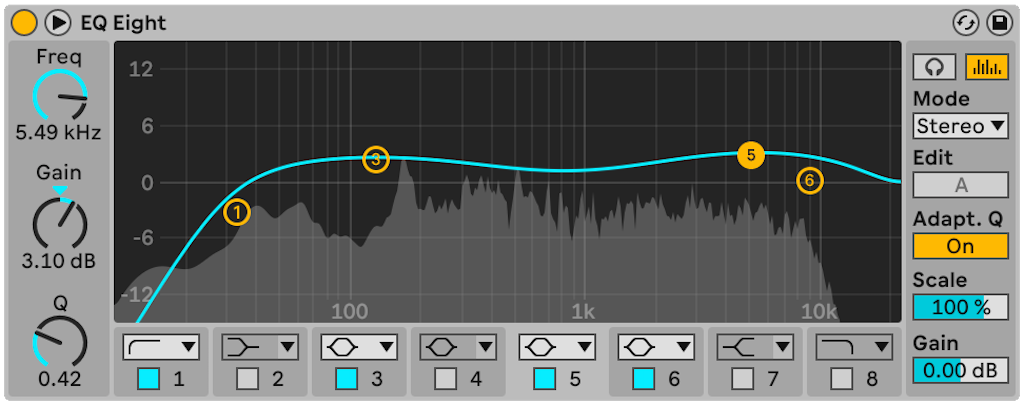
In my chain: Analog mode, high-pass at ~20 Hz, gentle roll-off from ~12–15 kHz, everything between flat.
Screenshot: Ableton Live 12 manual · ableton.com
WHAT OZONE DOES
Static parametric tone shaping in minimum-phase Analog mode. My settings are pure bookend cleanup: sub-sonic rumble out, ultra-top harshness shaved, midrange untouched.
DIAL IT IN
- Band 1: high-pass filter, Freq 20 Hz
- Band 8: high shelf, Freq ~12 kHz, Gain −1 to −2 dB
- Bands 2–7: off
- EQ Eight is minimum-phase like Ozone's Analog mode — nothing to set, it just behaves the same
LISTEN FOR
Tighter, less woolly low end on big systems; slightly less fizz up top. It shouldn't sound "EQ'd" — just cleaner. A/B band 1: if the bottom gets flabbier with it off, it's earning its place.
Impact → Multiband Dynamics STRONG
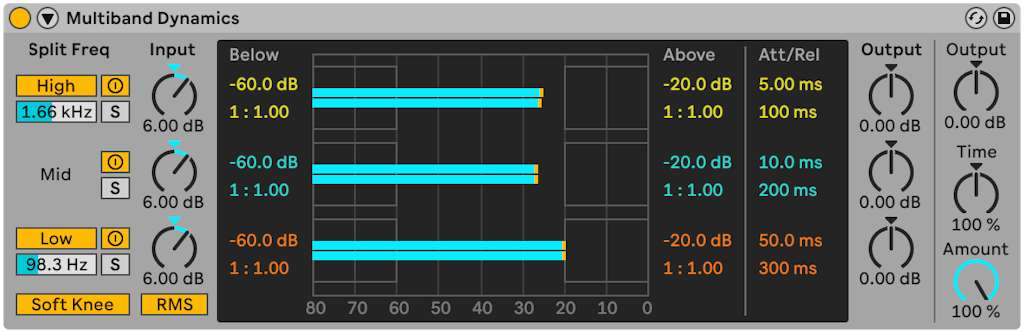
In my chain: 4 bands (≈100 Hz / 650 Hz / 10 kHz), values −38 / −69 / −30 / +3, 100 ms envelope — compress the microdynamics down low for glue, slight expansion up top for air.
Screenshot: Ableton Live 12 manual · ableton.com
WHAT OZONE DOES
Impact works on microdynamics — the tiny, fast level fluctuations inside the sound. Negative values compress for density and glue; positive values expand for openness. My chain glues the lows/mids and breathes the highs.
DIAL IT IN
- Split freqs: Low/Mid ~120 Hz, Mid/High ~2.5 kHz (3 bands — my middle two fold into one)
- Low: Above-threshold compression, ~2:1 — weight glues together
- Mid: Above-threshold compression, ~3:1 — the "expensive" density lives here
- High: Below-threshold upward expansion, subtle — hats stay alive
- Soft Knee on, Time 100% — aim for 1–3 dB of movement on the meters
LISTEN FOR
Kick and bass fusing into one weight; the groove feeling locked. If transients dull or the track flattens, back the mid-band ratio off first — that's where glue turns to mush.
Imager → Utility STRONG
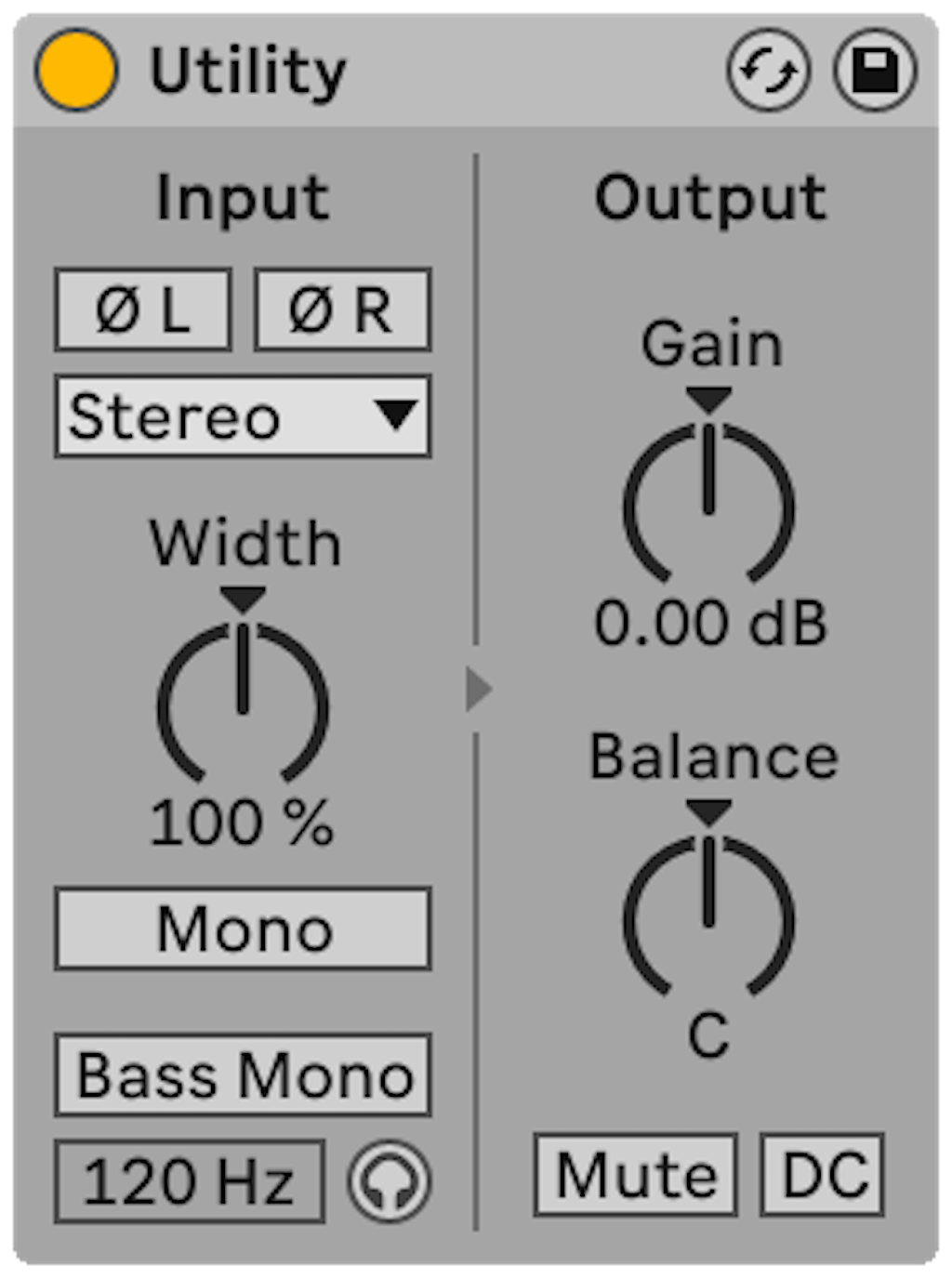
In my chain: 4 bands (≈100 Hz / 700 Hz / 10 kHz), widths 0 / 29 / 31 / 55, Recover Sides +3 dB — mono subs, progressively wider tops, club-safe.
Screenshot: Ableton Live 12 manual · ableton.com
WHAT OZONE DOES
Per-band stereo width: my band 1 at 0 collapses everything under ~100 Hz to mono (phase-coherent club low end), width opens up the spectrum, and Recover Sides feeds body back into the middle so narrowing doesn't hollow the image.
DIAL IT IN
- Bass Mono: ON at ~120 Hz — this is the money move, one click
- Width: 100%, nudge toward ~110% only if the mix wants air
- Want true per-band width? Audio Effect Rack → 3 chains → EQ Eight isolating lows/mids/highs → a Utility per chain (0% / ~30% / ~55%)
- Use the Mono button to check mono compatibility — if the bass vanishes, something's too wide
LISTEN FOR
Low end centered and heavy in mono; width that feels natural, not phasey. Honest limit: plain Utility can't widen per band — but Bass Mono + Width covers the move that actually matters.
Clarity → dynamic resonance cuts PARTIAL
In my chain: Amount 25, Tilt 0.0, Attack/Release 100 — gentle adaptive resonance taming across the spectrum, tonally neutral.
Screenshot: Ableton Live 12 manual · ableton.com
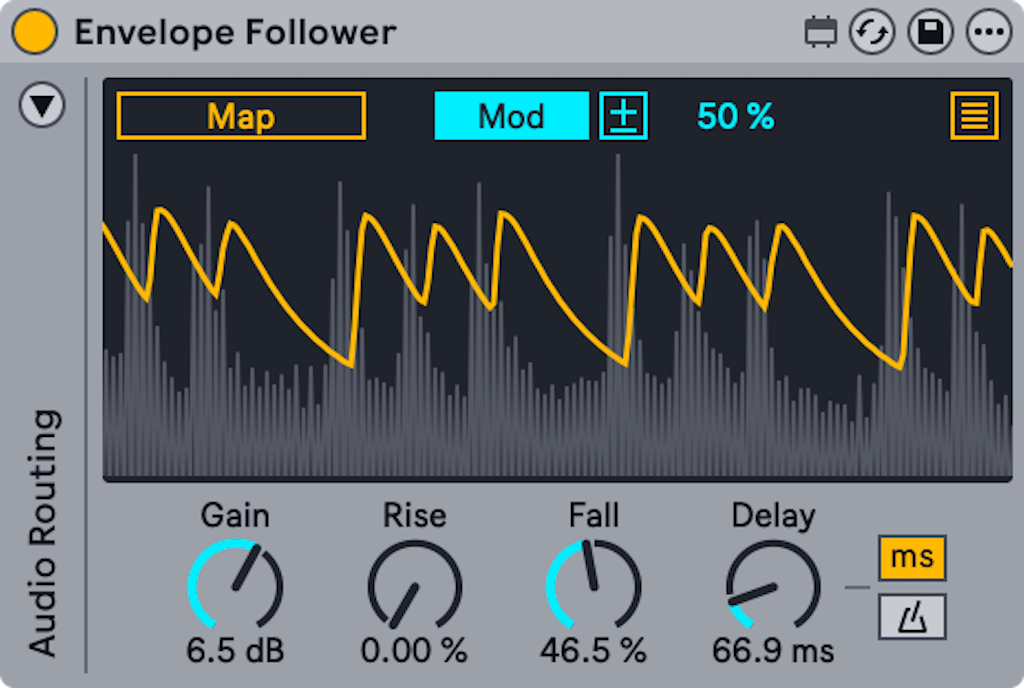
Screenshot: Ableton Live 12 manual · ableton.com — Envelope Follower is a bundled Max for Live device
WHAT OZONE DOES
Clarity adaptively contours hundreds of spectral bands to tame resonances and unmask background material in real time. Nothing in stock does the "hundreds of bands" part — but the intent (resonances get cut only when they flare up) translates directly.
DIAL IT IN
- EQ Eight: narrow bells (Q 2–4) on the resonances you find by sweeping — start with ~200 Hz, ~300 Hz, ~5 kHz, all at 0 dB
- Envelope Follower before it: Map → click each bell's Gain, set mappings inverted so loud resonances duck themselves
- Rise: fast, Fall: medium — catch it quick, let go smooth
- Small amounts — 1–2 dB of ducking on peaks, not a tremolo
LISTEN FOR
Harsh frequencies softening and background textures emerging — without the mix getting brighter. The stock version needs you to find the resonances first (sweep a bell until it hurts, that's the spot); Ozone finds them for you. That's the gap.
Stabilizer → target-curve EQ + referencing PARTIAL
In my chain: EDM target, Cut mode, Amount 25, Speed 100, Sensitivity 30 — gentle adaptive cuts keeping the tonal balance on a target curve, never boosting.
Screenshot: Ableton Live 12 manual · ableton.com
WHAT OZONE DOES
Stabilizer listens continuously and shaves off anything poking above an EDM tonal-balance target — cuts only, so it can't wreck a working tone. It's an auto-pilot you can't build in stock: no Ableton device adapts to a target curve.
DIAL IT IN
- EQ Eight as a static stand-in: gentle −1 dB bells on the 2–3 spots that jump out against a reference track
- The real move is the workflow, not a device: A/B against a released reference in your genre, match the broad balance by ear
- Keep it cut-only like my settings — if a region needs a boost, the problem is usually the mix
- Check it section to section: the goal is the intro and the drop sharing one tonal balance
LISTEN FOR
Consistency — no section suddenly jumping out as harsh or boomy next to your reference. It won't move on its own like Stabilizer, so re-check it every session with fresh ears.
Dynamic EQ → Envelope Follower → EQ Eight STRONG
In my chain: Analog mode, 4 bands cutting downward when triggered — ~200 Hz, ~300 Hz, ~5 kHz, top end. The final safety net.
Screenshot: Ableton Live 12 manual · ableton.com — Envelope Follower is a bundled Max for Live device
WHAT OZONE DOES
Threshold-triggered cuts at four programmed spots: low-mid buildup, presence harshness, top-end fizz — each ducks only while its region misbehaves, then gets out of the way. Static cuts would dull the quiet sections; these keep the loud sections clean.
DIAL IT IN
- EQ Eight: bells at ~200 Hz (wide), ~300 Hz (narrower), ~5 kHz, plus a top-end band — all 0 dB static
- Envelope Follower → Map each band's Gain, inverted mappings
- This is the textbook stock dynamic EQ — one follower can drive several bands, or use one per band for independent timing
- Set the "threshold" by ear: raise the mapping amount until cuts engage only in the loud sections
LISTEN FOR
The drop stays clean at full energy; the breakdowns sound untouched. Bypass the follower — the harshness should return only in the loud parts. If it pumps, slow the Fall.